Showing posts with label home improvement. Show all posts

Monday, September 07, 2009

Diagnosing a Whirlpool GJC3634 smoothtop range

We bought a Whirlpool cooktop for last year's kitchen remodel. Our cooktop, the GJC3634RP03, has a white surface, which means a lot of elbow-grease (usually mine) and baking soda whenever we cook, but there are no drip pans. It's not an induction range, so we can use all kinds of cookware. The heat settings need some getting used to. It's not perfect, but overall we're satisfied.

element layout of whirlpool gjc3634rp03 range At least we were, until the central part of the center-rear element went kaput. Here's the deal: the control can be set to heat up just the inner part ("single" I think it says) vs the entire, larger concentric disk ("dual"). With the inner burner dead, setting the burner to "single" gives you nothing, whereas "dual" gives you doughnut-shaped heating. The latter almost works OK for pancakes, but it's harder to get the heat right.

A look at the wiring diagram convinced me that it could not possibly be the normal-vs-simmer control, which would have affected both elements equally. I immediately suspected the burner, just because, but the control is an equal-opportunity point of failure. The range didn't go into the kitchen 'til October, but we took delivery in June or July, so we're out of warranty already.

Nothing for it but to do a little disassembly. I started by turning off the breaker supplying electricity to the range. I verified that it was indeed off by turning one of the burners "on" and noting that the power indicator didn't light up (it does so, instantly, when power is connected).

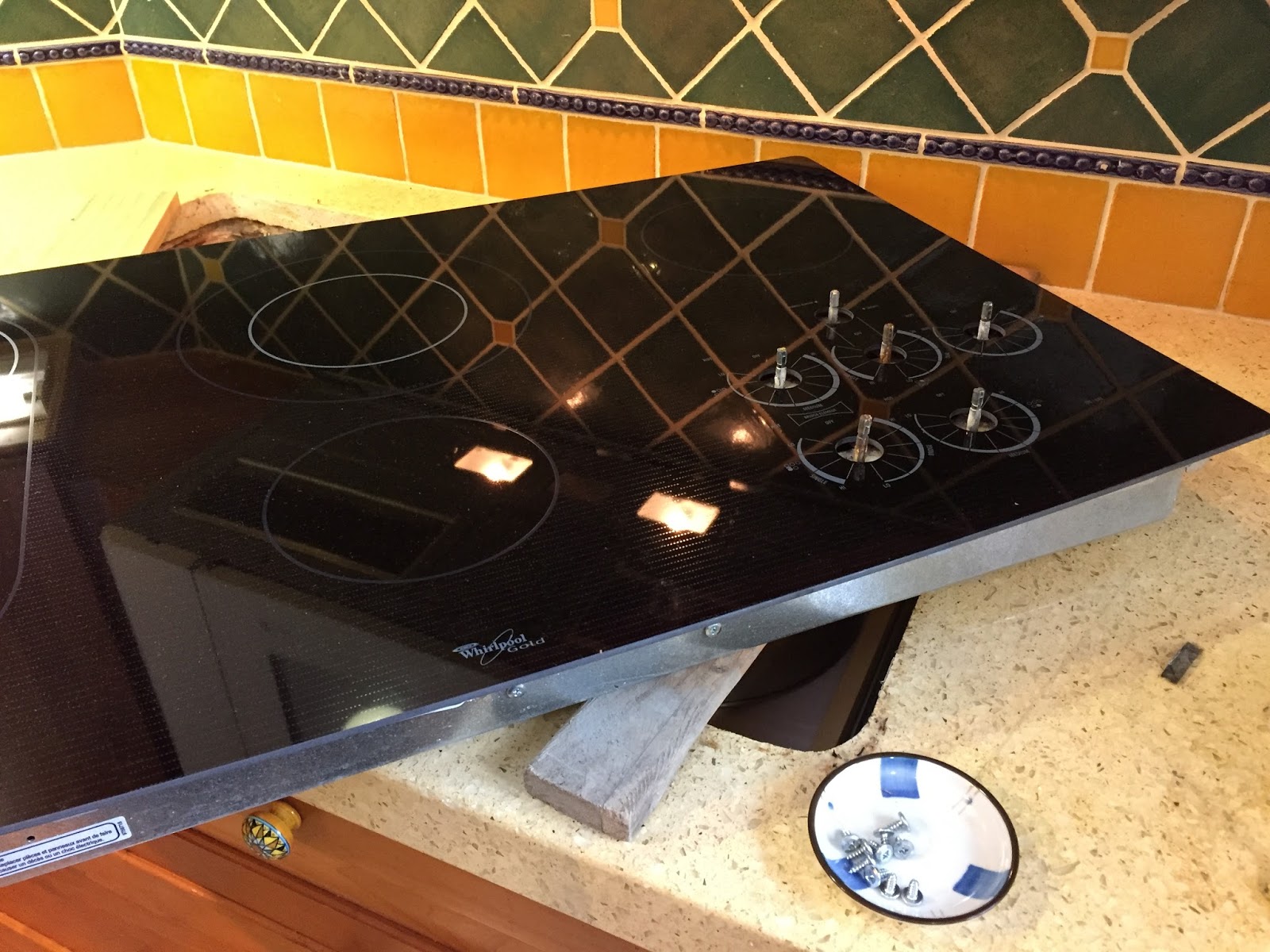
Sticking my hand under the range, I levered it part-way out of its cutout and took a look. It turns out that the smooth white top is attached to the guts of the stove with ten screws (three along the front, three on the back[unverified], and two on each side). I supported the front edge with a skillet, as shown in the photo at left, and removed the screws (one position is circled in magenta in the detail).


With 7 screws (3 in front and 2 on each side) removed, you can lift the front edge of the stove and take a peek inside. In the photos, I lifted the surface just enough to see what was going on with the heating elements. The element of interest (the center rear) has three electrodes -- no surprise there -- indicated with magenta arrows in the detail.

At first, when I put the ohmmeter on the, uh, un-common electrodes (with gray/white and gray/black wires), it showed a dead short! Turns out it was an effect of the control; in the "off" position, it ties the un-common electrodes together. I verified this by switching the control to "single"/low and they no longer showed as a short. But just in case, I pulled each wire off when checking for continuity with the common electrode. One showed continuity and the other didn't. That's the smoking gun; it's the element rather than the control. Too bad; the element is about $100 whereas the control is about $40. Next step, ordering the element from Appliance Parts Pros (about $8 less than at Sears).

Saturday, February 14, 2009

V-Tech M16896 5.8GHz cordless phone goes belly-up

A long, long time ago (longer than the warranty period anyway), we bought a V-Tech cordless phone from Costco -- it also has a digital answering machine in the base station.

The other day, the lovely Carol called me at the office. The phone was acting up, she said. All the handsets just say "CONNECTING..."

What could it be, she wondered.

First, I suggested that she look for a loose cable end. Follow it, make sure both ends are secure, etc.

When I got home that evening, I took a look -- cable looked secure and intact. I disconnected it from wherever it was plugged into, and connected it directly into the phone jack in the wall. Still "CONNECTING..."

Well, I wondered if the software had gotten into some silly state. I turned the base unit upside down (I removed the handset first) and disconnected the power cord from it. After a few seconds, I reconnected the power cord. I replaced the handset, and it said "HANDSET 1" -- yippee!

The next day or so, I noticed that one of the handsets says "CONNECTING..."; I tried moving it to another charger, but nothing changed. The others all said "HANDSET #" where the "#" was a number....

So we started with four "bad" handsets and now we were done to just one.

Would the same trick work? I opened up the "bad" handset and disconnected the battery, waited a few seconds, and re-connected it. Did it work? "HANDSET 4" -- yippee!

The reason I tagged this with "Computers" is that these things have microprocessors (well, you could call them microcontrollers) in them. But like mi¢ro$oft computers, they may occasionally need a reboot -- but these can go months (e.g., since the last power failure or the last time we unplugged all the phones) without rebooting. btw I'm typing this on a SuSE Linux 9.3 box which says...
$ uptime
11:01am up 178 days 2:53, 32 users, load average: 1.22, 1.05, 0.86
$

Saturday, October 25, 2008

Knobs!

The kitchen is just about complete now. The latest is that we have knobs. From Italy. These knobs influenced the design and color scheme of the whole kitchen. This photo shows the kitchen in its, uh, natural state.

Allow me to point out a few of the features of this kitchen, besides the knobs. The vacuum cleaner actually fits in one of the pantry-cabinets you see on the left; it's out for cleaning up sawdust.

The cylindrical trash receptacle is nice to have for two reasons: first, if you're breaking eggs, say, somewhere other than where the pull-out trashcan drawer is, you can drag the trash-can to where you're producing the empty egg-shells and drop 'em in forthwith. Second, if you're loading the dishwasher, then the trashcan drawer won't open! Well, it'll open a couple of inches, but not enough. So having a portable trashcan is a big help.

Then there is the white step-stool. When you're 5'3" or so, as we are, it's awfully nice to have. This step-stool has a very nice characteristic: no matter where you stand on the platform, your weight will be inboard of the stool's legs. We have had others, shaped like "TT" where, if you stood on the outer edge, your weight could tip the thing over, resulting in a cracked skull or a broken toe.

Finally, there is the chair with the cushions, covered by the skin of the fabled Nauga®. One can sit at the breakfast bar in these chairs, but... the kitchen floor is higher than the living room floor, and if you position the chair a little too far from the bar, it'll lean back and crack your skull. I think we'll hide the chairs for our kitchen-warming party.

Saturday, October 18, 2008

Ikea Stockholm cabinet assembly: 109067 etc.


I went to Ikea with the lovely Carol, and we selected a black Stockholm cabinet. Of course some assembly was required. Step 1 was to screw in twenty (20) pegs or whatever. Whew -- felt like having a beer after that, but with 21 steps to go, I dared not.

Subsequent steps were easier, until I got to step#14, which was an exercise in science (physics, materials science, anthropology, textual criticism, etc.) because I did not grok the picture. Well, I got the idea that for this step I should be sure to use the 109067 screws, not the 100344.

What's the difference between the two? From the picture (in the image scanned here and in the front of the instruction booklet) what I noticed was:
  1. 100344 is shorter;
  2. 100344 is fatter;
  3. 100344 has coarse threads (vs finer threads of 109067).
  4. And: 100344 has a combo Phillips/slotted head whereas 109067 has a Phillips-only head; I didn't notice that before!
The instruction book said that all eight of these lookalike screws were supposed to be in bag#1, but there were 4 in bag#1 and 4 in a separate bag all by themselves (the "elite" screws).

Now when I looked at the "elite" screws, I found they were maybe a little longer than the others, which argued for their being 109067. They felt a little fatter than the others, which contradicted the length thing. The threads had exactly the same pitch AFAICT, though the "elite" screws had a threadless part on the shank, like lag bolts. The "elites" were sorta brass-like in color vs chrome, and they had a combo Phillips/slotted head.

With those differences, I decided that the "elites" were 100344 and the common screws were 109067, based on the following logic:
  1. 109067 is for a right-angle bracket that's pretty thin, hence we want the screws there that have threads all the way up to the head. In contrast, 100344 is for attaching a sorta "arched" part of the hinges, so their lag-bolt-ish feature wouldn't hurt.
  2. The other screws that hold the hinges have both
    1. a brass-like color and
    2. combo heads, not Phillips-only.
  3. 100344 goes into particle board but 109067 goes into something that looks like hardwood. Though the holes looked about the same size, it stood to reason (I thought) that the hardwood stuff didn't need as fat a screw in order to hold.
Since this took a fair amount of deduction etc., I thought I'd tell you about it.

The good news is: in the process of writing this I discovered that the picture indeed showed 100344 with a combo head (connecting "D" above with "2.b", so my judgment was vindicated. Whew!

Bottom line

The definitive difference between 109067 and 100344 for this cabinet is that 100344 has the combo Phillips/slotted head, whereas the 109067 is regular Phillips. Ignore the differences in length and thread-pitch suggested by the pictures in the instruction book. 109067 may be in bag#1 (with 100344 in a separate bag) or they might be packed together in bag#1 as the instruction book says.

Good luck and enjoy!

Sunday, July 13, 2008

unclogging a slow (not blocked) toilet

So the toilet started slowing down. I mean, it didn't overflow -- it just looked like it was going to. I tried emptying buckets of hot water into the toilet, hoping that it would melt any grease that might be causing the slowdown... but no joy.

I have a 15-foot "snake" that looks something like this one but I couldn't get it to go where I needed it to.

After reading a fix-it-yourself book and talking to Pat (aka "The Man"), I decided I needed a toilet auger, so I got one from Home Depot for $7.65 plus tax. It looked approximately like this. These things are terrific because you can push the elbow-shaped pipe into the right place, then feed the cable with the auger-end into just the right place. (If that link doesn't work, try this article. Note, however, that their text apparently came from a different kind of unclogging operation!)

Anyway, I fed the toilet auger into the toilet, and pushed and pulled the cable a few times, and pretty soon got the impression that something was getting broken up. You really don't want any more details than that.

A pail of cold water went right down, and everything was happy after that. I went outside and sprayed off both the snake and the toilet auger with the hose, then with WD-40.

I love a successful home repair; it makes me feel like a Real Man.

Saturday, May 03, 2008

Kitchen remodeling: the good and no-so, Part I

We'll probably do Part II after construction is done.

First, the good: Based on a referral, we worked with a kitchen designer who lives in San Jose. We sent sketches and measurements and photos, and our wish lists, and she produced a very nice design. But she's quite busy (she teaches at a small college and she also has young children) so it took several weeks. She's a private individual and I don't want to put her contact information in a public place like this. Leave a comment or send me email if you want to use her for your kitchen.

Another thumbs-up goes to Quesco for friendly professional staff, terrific service and great prices. I review them on yelp here.

Our contractor is a personal friend -- Art Prindle of Art Prindle Construction. He has done several projects for us
  • bathroom repair/remodel
  • installation of ducting and a forced-air furnace, including redoing a bedroom closet
  • garage conversion including
    • a loft (his design idea -- we love it!)
    • half-bath and laundry room
    • roof reframing
    • roof re-sheathing (whole house)
    • replacing the den's flat roof with a pitched one
  • pocket-door installation (small project)
He's done great stuff for us and we recommend his services without reservation. But we are not unbiased :)

In the dog-house: sears.com and bizarre model numbers

For the not-so-good part, it's the sears.com website and its brother searspartsdirect.com. So here's my whine. You go to Sears and order some appliances -- an oven, a warming drawer, 'fridge, dishwasher, etc. On the receipt you find two or three numbers related to each appliance: a 5-digit model# (e.g., 77542), an 11-digit item number (e.g., 04677542000) and possibly some other number that might be similar to the "item" number.

If you search the sears.com website for further information (like dimensions, clearances, etc.) the above numbers might help, but in this case (for the 'fridge), neither of them was good for anything. The sears.com website doesn't confess to knowing anything about this model number. (A google search turns up a sears.com reference -- and I could see it in google's cache. But no specs or dimensions were available -- just the overview.) And you can just forget about finding a manual using either of those numbers.

No, what you need is the model number, which in this case is 79577542600. Actually it's the "full model number". With this full model number, you can search searspartsdirect.com (not sears.com!) and find a link to a manual. Owner's manual (or "use and care manual") though -- no installation manual. To get the manual you have to create an account on searspartsdirect.com -- give them your email address and create a password (just what you needed, right?) and then you can look at the manual on your screen.

I sent them email, which got me an answer that was almost completely off the point. "Look at the model# on the back of your appliance and use that 9-12-digit model# on searspartsdirect.com" or something like this. After some email exchanges, somebody sent me the full model number for the oven.

Meanwhile I also called; I heard this was the supported way to get the full model number. It took a call to the parts number, getting transferred to home delivery (why??) -- where they couldn't match up my order to my phone number (even though I was calling from the same phone# that appears on the invoice), and explaining my situation maybe 3 times on the phone.... The good news is that I did eventually get all the model numbers of interest.

The way this should work is like the Whirlpool website. I ordered a cooktop, a whirlpool GJC3634RP, and if you search for it on whirlpool.com you'll get here. If you click on "back to GJC3634R" you'll see this page. Click "Guides + Literature" and you can see manuals.

Or like GE's: if you have a model number in mind, you can google for it and see a "geappliances.com" website. Go there, click on "Product Documentation," and you'll see installation instructions, use/care guide, etc., available for download. Click the appropriate one, and you'll see the installation guide or whatever.
Maytag's website is not as nice as the above. Many of their pages require a macromedia plug-in (Dude, I just want the manual!), and this google search didn't lead me to a manual. This one offered up some sites from www.manualnguide.com, which doesn't seem to resolve any more:
$ host www.manualnguide.com
Host www.manualnguide.com not found: 2(SERVFAIL)
However, it did lead me to http://www.insideadvantage.com/catalog/product.jsp?categoryId=37&productId=2090 which offers a trilingual user guide, but no installation manual...

So if you're going to order appliances for a new kitchen, and you really have to have Sears, then get the sales guy to find the "full model number" for you if you can. If you can't, then you can call Parts, but they might transfer you to Home Delivery. Anyway, explain that you need the full model numbers. You will need to do this more than once, but they'll eventually get you someone who can tell you.

Then go to searspartsdirect.com and feed it the full model number. You should get at least one result; if needed select one, and then look on the right-hand side for the manuals link. This sends you to yet another website (managemysomething.com) where you have to have a login (email address, "screen name", password) to download the manual.

And other things being equal (check consumerreports.com for frequency-of-repair records, etc.) my suggestion would be: Figure out the model number you're interested in, and see if you can find the installation manual on the web, because your contractor or cabinetmaker will need that information.

More later....

Tuesday, November 20, 2007

It works!

My parents came in last night, and we had some nice visiting time. Took the day off today, and my dad had a device for the porch light: a photocell-controlled switch. Had to remove the fixture from the wall (I started by disassembling the fixture but that was a "D'oh!"); it was a few parts -- 470KΩ resistor, CdS photocell, triac, maybe one more -- after assembling it (including bolting the heat-sink to the fixture), made a quick check with the multimeter, then hooked it up. Success! Well, when we had the photocell pointed correctly it was successful, anyway. Some adjustment will be needed.

Next up was the dryer timer. I bought it a week and a half ago so it was just a matter of installing it. Unscrewed two screws to get the front panel disconnected from the top of the dryer, then a bunch of hex-head screws (¼" nutdrivers). The new timer was an exact match for the old one, thank goodness. (It can be a real pain if it's not.) I transferred the wires one at a time (the terminals were evan all labeled the same!), put everything back together, and plugged it in. I set the dryer timer for 10 minutes on air-fluff, and 5 minutes later, it had definitely moved.

A desire accomplished is sweet to the soul!

Mom and Dad took us out for dinner -- Su Hong. The food was terrific as usual.

Well, that was a great day off. Tomorrow it's back to work, and then we'll give thanks.

Sunday, August 26, 2007

Epson CX5400 printing blank pages

Like some others, I've had trouble with an Epson CX5400's printing blank pages. We had some problems with this printer before, but they were always taken care of without hardware repair. But this time, we had a real problem of some kind.

So I found the above site, which led me to the Dura-Brite ink information page; this in turn pointed me to some disassembly instructions. When I looked at these, I said, golly, do I really have to remove the scanner part, the front housing, the middle housing, etc., to get to the print head?

Basically, yes. This guy (who has clearer photos) says so too. Now if you follow the above disassembly instructions, you want to remove the scanner unit, the upper and middle housings, but do not actually remove the printer head. Paradoxically you should push the carriage lock lever forward and slide the print head left (step#4). The puzzling part is that, if you just turned off the printer "normally", then the cartridge-holders will be stuck on the far right of the printer (as you face the printer), and the carriage-lock lever will be to the LEFT of the cartridge-holder/print-head thingie.

Now that I know that, the photo here (figure 4-37) makes sense to me, but until then, I was totally puzzled. It was not only because I'm dyslexic (or dysphotic) but also because I had the wrong mental map of what was going on.

The other thing that happened here is that there was a rogue piece of paper stuck on the right-hand side of the Carriage Unit. I suspect that this stray piece of paper might have had something to do with ink misbehavior, but I don't know for sure.

Well, I just wanted to write that stuff down before putting the printer all the way back together. Here's hoping it all works.

(half an hour later)
Well, it didn't. Not sure what's next.

Time to buy a new printer :^(

Friday, July 27, 2007

Fixing a washing machine: Kenmore series 80, model 110.28802890

If you have a Kenmore Series 80, model number 110.28802890, and your washing machine fills and fills and keeps filling -- even though you've got the water level set on small load... and the book's advice (i.e., ensure sufficient air gap for the drainage hose) doesn't help, then the problem might be what I had. To find out, here's what you gotta do.

First, open up the control panel. If your control panel looks like this:
then pop off both end caps and remove one screw under each one:

Slide the bottom of the control panel toward you then lift it, then flip it over so you can see the underside. On the left side, behind the water level switch, it should look like this:

See that hose? If it's not connected to the water-level control -- i.e., if it's just hanging loose like mine was -- then that will tend to make your washing machine fill and fill and fill, because the water-level control doesn't know how much water is already there.

Anyway, after replacing the hose, I set the water level on "small load" and started it. After a short time, it stopped filling and started agitating. Yipee!

Update: 02 Novmber 2008

It happened again! Same cause, too. So, two tips:
  • When you stick the hose back on, don't just jam it back on; it might fall off again. If you have a hose clamp handy, use that (don't overtighten!) -- if you don't, a piece of solid #12 or #14 wire, wrapped around the end of the hose, should help (again, don't overtighten). Also, is there anything, like a stupid-looking clip, that would tend to put tension on the hose and pull it off the control? Unhook it from said clip.
  • Second, once you replace the hose, drain the washer completely before testing. I drained it only part way, and the pressure or whatever didn't equalize. Move the control over to the spin cycle, then let it drain. Then fill again, setting "small load" and set a timer for about 5 minutes.
Better luck (to us all) next time!

Monday, May 28, 2007

Using a blowbag to clear a slow drainpipe

In our kitchen sink, there is a garbage disposal, which grinds stuff up so it can flow down a 2" pipe into a bigger drainpipe and out to the sewer.

The other day, that 2" pipe got clogged, which by itself would be bad enough -- but we have a shower that shares the drainpipe with the kitchen sink, so it backed up, turning the shower floor into an icky awful mess; I will not show you a photo of it. (You're welcome).

My mission, which I chose to accept, was to clear the drainpipe so that the stuff could flow out, rather than into the shower, and to clean up the mess.

The solution

The basic idea was to find the "cleanout" -- a pipe end I could uncap to clean out the drainpipe. I had to uncap it and use a blowbag to flush the obstruction out.

Uncap the cleanout

To find the cleanout, you have to find the 2" (or so) pipe that the kitchen sink drains into. This 2-incher slopes down to reach the bigger drainpipe. In our case, the cleanout is above the point where the 1" (or is it 1½"?) pipe from the kitchen hits the 2" pipe. I'm going to guess that if you google on "cleanout" and "drain" you'll find a useful diagram or two.

So I found the cleanout and tried to unscrew the cap with a pipe wrench:

Trouble was, I couldn't budge it. I tried putting the wrench on the other way and standing on the end. I tried banging on it with a 3-lb. hammer. I got a screwdriver, placed it against one of the bumps on the cap, and whacked it with the hammer. I got a piece of rigid electrical conduit to try to increase my leverage on the pipe wrench, but it wasn't big enough. Nothing seemed to work, until I remembered that I had a hydraulic floor jack:


That actually worked. If you try this at home, by the way, it's a good idea to put a big sign on the kitchen faucet -- that way, nobody will decide to run the water while you're outside (or under the house) struggling with the drainpipe.

If it's been long enough since your latest flood, you won't have a flood of goop fly out of the cleanout when you get it uncapped. If you're under time pressure, best you put a bucket under the cleanout. A big bucket. A tub.

I didn't have that problem this time around, but it has happened before. You'll want to use a bucket that you don't mind soiling.

What is a blowbag?

Here is a picture:


That was taken after it did its work, but here's the story. Its main body is made of some kind of black rubber. At one end is a brass fitting that you attach to the end of a garden hose. At the other end is some kind of flow restrictor. I fed it into the pipe -- making sure to feed it in far enough -- i.e., so that I would flush the goop further down the 2" pipe, rather than up into the shower or back into the kitchen sink.

In my case, that was about 5-7 feet, so to make sure I fed the hose at least ten feet into the drainpipe. Here's another picture:


(actually taken afterwards, as I was pulling it out -- as if you couldn't tell).

Then I turned on the hose full-blast. The blowbag expanded to the diameter of the pipe, then the "exhaust" end of the blowbag sent pulsating jets of water down the drainpipe. This forced accumulated sludge out of the 2" drainpipe into the 4" line that runs into the sewer line under the street (in our case, the alley behind our house).

I used hot water in the hose, but cold is also OK.

I heard the vibrations in the house, and turned off the hose after about a minute. Then I extracted it slowly from the drainpipe.

My next step was to re-cap the drainpipe and test the flow down the kitchen sink. All was good, so I cleaned up the hose, and the shower, changed, and took a shower myself.

Helpful(?) hints

  • Do this job early in the day if possible. There are many reasons why. From the photos above, though, you can see that I didn't take my own advice. I think I learned of the problem after I got home from work in the evening, but didn't want to deal with it until after dinner. Then I conveniently forgot about it until after dark. That was not so convenient.
  • Take a look around the house for cleanouts, and have at least one blowbag of appropriate size on hand before the need arises. Your spouse and your children will think you're a genius. Of course they'll be right!
  • A corollary: Have pipe wrench(es) on hand that are big enough to deal with the cleanouts.
  • Another corollary: If you don't have a floor jack, have a piece of rigid pipe big enough to accommodate the handle of the pipe wrench. Then you can use the pipe as an extension of the pipe wrench handle. A 3-5 foot pipe (insert the entire handle into the pipe if you can!) ought to give you enough leverage to deal with any sewer cleanout. If not, you may have to pry open your wallet and call a plumber.
  • Be really sure, when unscrewing the cap from the cleanout, that you're turning it in the right direction -- i.e., that you're trying to loosen it, not tighten it. Don't ask me how I know.
  • When replacing the cap, be really careful not to cross-thread it. Don't ask me how I know.
  • Use your oldest, dirtiest, ugliest garden hose on the blowbag. For the reason why, take a close look at the photos above. See how icky the hose looks after doing this job?
  • Corollary: Be sure that you don't mind staining whatever clothes you're wearing. Shoes, too.

Saturday, December 09, 2006

Replacing a timer: General Electric WB19X5249 in a JBP26G range

Some months ago, the mechanical timer on our GE range started buzzing. Sometimes we could make it stop by delicately adjusting it; other times it would decide you were trying to set it for 59 minutes and 15 seconds... and would tell you about it later. Not to worry, I said; let me stick a toothpick into the buzzer. This (top view) is not the recommended way to fix it:
timer fixed by toothpicks
This fix means you can't use the timer on the stove, but that's OK; a timer costs $9.95 and you can put it on the dining table or something. Well, that worked OK for a while, and then I couldn't get the clock to do anything at all. This was mostly OK, until we switched from Daylight Savings to Standard Time; I pulled the circuit breaker, turning the stove (and its clock) off. An hour later, I turned it back on.

Then last week, one of the controls broke. When my wife turned the front burner on WARM or LOW, the element got real hot real fast (it glowed red).

I suppose I could have just written "HI" everywhere on the knob that wasn't "OFF", but there were two problems with it — first, I didn't think of it until now, and second, it wouldn't have gone over very well. She called, they had the parts in stock, so off we went. The new control for that front right burner took a little guesswork, but basically it works now.

STOP! Before going any further, UNPLUG the range! As one of my wiring books says, Think! Stay alive!

The timer was a little more complicated. First of all, you can't buy those mechanical timers any more. What you get is one of those new-fangled electronic digital thingies that looks like this:

So there's one thing you should definitely do, even before you leave the store. First, let me explain that whereas the old mechanical timer had shafts sticking out of it (and "female" knobs that fit onto them), the new timer has holes. But fear not; they give you these knobs that are, umm, "male". Here is a close-up of one:


Find three of these guys, insert them into the appropriate places in the timer's front panel, and give each one a gentle push. Make sure the switches give you a little tactile feedback. On the first timer I got, the "UP" and "DOWN" ones worked OK, but the "MODE" one felt like it was just a dummy button. The problem was that the circuit board was warped, so the shaft didn't quite reach the button (...biting my tongue as I write this...) mounted on the circuit board. The switch, in other words, was too far away from the front of the timer unit, making activation impossible.

I didn't find out about all this until I had removed the old timer, inserted the new one (a LONG process), wired it up, etc. So save yourself the trouble — make sure the timer and the knobs actually work together.

OK, now that you've got the timer, how do you replace the old one? You have to remove the front panel from the range. Pull off the oven control knobs (one on each side of the timer). You'll need to remove one screw from each control to release the front panel. Here's the right-hand one (oven temp):


Notice how the bottom screw used to hold the front panel onto something, but the top screw can be accessed regardless whether the front panel is on or not? So remove the bottom screw here, and also the corresponding screw on the OVEN SET switch (to the left of the timer).

The next thing you have to do is remove these nasty "TORX" things that hold the ends of the front panel. There is one on each end cap and one at each end of the top. I don't have a regular TORX tool, but about 25 years ago, my dad bought me a set of screwdriver (etc) blades for my electric drill. Here is a picture of the screwdriver blade kit:


It's a very nice kit. The tool of interest is the leftmost one in that photo, so I guess the two blades you need are the TORX T15 and T20. Anyway, there are two pictures showing the end of the top of the stove, and the end cap:


The second one shows the TORX tool in the screw in the top of the stove. When you do this, watch out for the off-white plastic plugs. These guys hold the end-caps onto the top-rear flange of the front panel, and they have a tendency to fall out and roll under something.

Anyway, after you get all 4 TORX "screws" removed, you'll be able to drop the front panel.

You've disconnected the power already, right?

Oh! You need to get the back panel off, too, so you can get at the wiring and stuff. You want a 1/4" nutdriver for these. The far right (viewed from behind the stove) screw need only be loosened; you don't need to completely remove it. You do have to remove 4–5 others, though; then you can slide the top section of that rear panel downward and to the left, then off that right-hand screw.

Anyway, if you're more observant than I am, you'll probably notice that there is some mounting hardware in the box:

Probably you'll want to take those brackets, find four screws to attach them to the timer like this:

and mount it onto the stove like this:

But don't do it, because you won't be able to put the front panel (in this picture, lying on the cooktop surface) back on! This was a design gaffe on GE's part, in my not-so-humble opinion.

So here is what you should do instead. Take a screwdriver with a sharp blade, and, standing behind the stove, hold the timer carefully so you can see where you have to notch the sheet metal. Using the screwdriver, score the sheet metal where notches will be needed. A triangular file or (what I used) a single cut bastard mill file will do it. Here's the thing: even without the brackets, the timer won't slide backward and fall out the back. In fact, you won't even be able to put the front panel back on. You have to cut some notches in the vertical pieces of sheet metal, so that the timer can slide part-way back. That's what the file is for.

OK, here's a picture taken from the back of the stove, after I filed a couple of notches.

You can see the places where I scored the sheet metal, but the notches aren't very clearly visible. Here's a photo taken from the front; notches are more clearly visible here.

Note also the lack of mounting hardware.

You have to do that on both the left and the right. Installation of the front panel is the reverse of removal. Make sure the timer doesn't move around while you're replacing the front panel. Start the two (larger/longer) TORX screws atop the front panel, but don't tighten them yet. Double-check the position of the timer. Start (but don't tighten) the two shorter TORX screws to hold the end-caps to either side of the range. Now install the two screws that you took out earlier, one on each oven control knob, to hold the front panel on. You can tighten these. Then tighten the four TORX screws. Install the wiring. Plug the range back in and do a sanity-check on the clock.

NOTE: The instruction sheet is your friend!

Put the back panel back on. You probably moved the stove some in order to get at the back panel; now would be a great time to run the vacuum cleaner on the parts of the floor newly exposed, if you haven't already done that.

Return the stove to its normal working position. You're allowed to feel smug, but don't reveal that feeling to your spouse; there's no profit in that.